Keeping Your Inbox Tidy: Archived Conversations
Team Eldspark
AI Research Lead
Keeping Your Inbox Tidy: Archived Conversations
As your support volume grows, so does your inbox. Keeping track of active issues while wading through resolved or irrelevant conversations can be a challenge. That’s why we’re introducing Archived Conversations—a simple yet powerful way to declutter your workspace without losing history.
Why Archive?
In customer support, not every conversation needs immediate attention, but every conversation is valuable. The "Archived" status allows you to:
* Declutter your main view: Move finished or stalled conversations out of your active lists (Unsolved, Escalated, Resolved).
* Focus on what matters: Keep your daily view focused on customers who need help *right now*.
* Retain history: archived conversations aren't deleted. They are safely stored and can be easily accessed or unarchived at any time.
How It Works
We’ve integrated the archiving workflow directly into your existing dashboard, making it seamless to use from day one.
1. Archive a Conversation
You can now find an Archive button in the header of every conversation view. A single click moves the conversation to the archived state.
2. Accessing Archived Chats
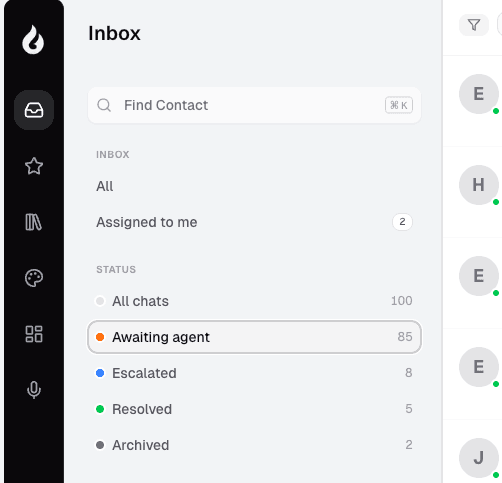
Need to find an old chat? We’ve added a new "Archived" filter to your sidebar. This dedicated view lets you browse through your archived history without mixing it with your active tickets.
3. Unarchiving
If a customer reaches out again or you need to reopen a case, simply click the Unarchive button, and the conversation will return to its previous state, ready for action.
Better Organization, Better Focus
At Eldspark, we believe that a clean workspace leads to a clear mind. By giving you the tools to organize your communications effectively, we help you spend less time managing your inbox and more time delighting your customers.
Start organizing your inbox today with Archived Conversations!